RTLS Studio 3.6
Welcome to the RTLS Studio 3.6 Product Tour.
This page highlights the most important new features and improvements introduced in this release. Each section provides a brief overview of the feature and its benefits, with links to detailed documentation where applicable.
NEW Ubuntu 22.04 and 24.04 Support
With RTLS Studio 3.6, we are updating our supported operating systems for the RTLS Server.
Support for Ubuntu 20.04 has been discontinued as we move toward newer long-term support environments. RTLS Studio is now fully supported on:
Ubuntu 22.04 LTS
Ubuntu 24.04 LTS
These newer platforms provide improved stability, better security updates, and more up-to-date system packages, ensuring a reliable and future-proof environment for RTLS deployments.
NEW Network test during anchor initialization
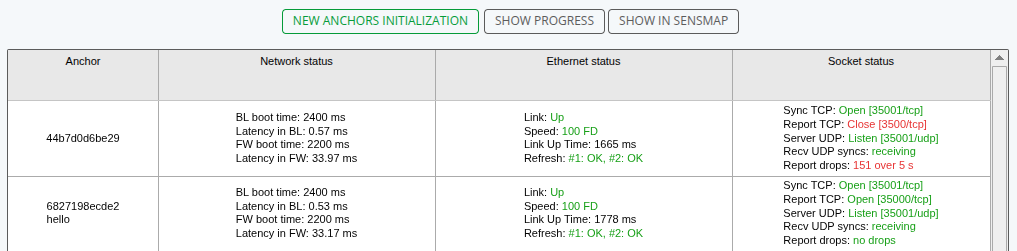
A network diagnostic test is now included in the anchor initialization process..
This built-in test automatically checks communication between anchors and the RTLS server, helping detect potential connectivity issues early in the deployment process.
The network test is particularly useful during:
Initial infrastructure setup
Deployment validation
Production environment testing
By identifying network issues sooner, this feature helps streamline installation and reduces troubleshooting time for both partners and customers.
NEW Default zone configuration
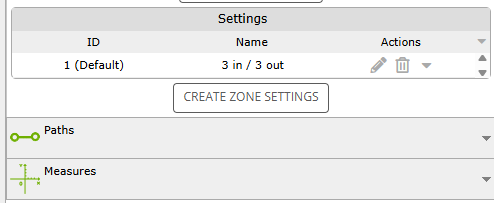
With the latest version of RTLS Studio, we established a new default configuration for virtual zones called “3 In / 3 Out.”
This setting has been established based on insights gathered from multiple real-world deployments. The configuration is designed to improve the reliability of zone-based events and reduce unintended zone transitions.
While this configuration serves as the new default, all zone parameters remain fully customizable, allowing you to tailor zone behavior to your specific project requirements.
NEW Filtered Batch Updates in RTLS Manager
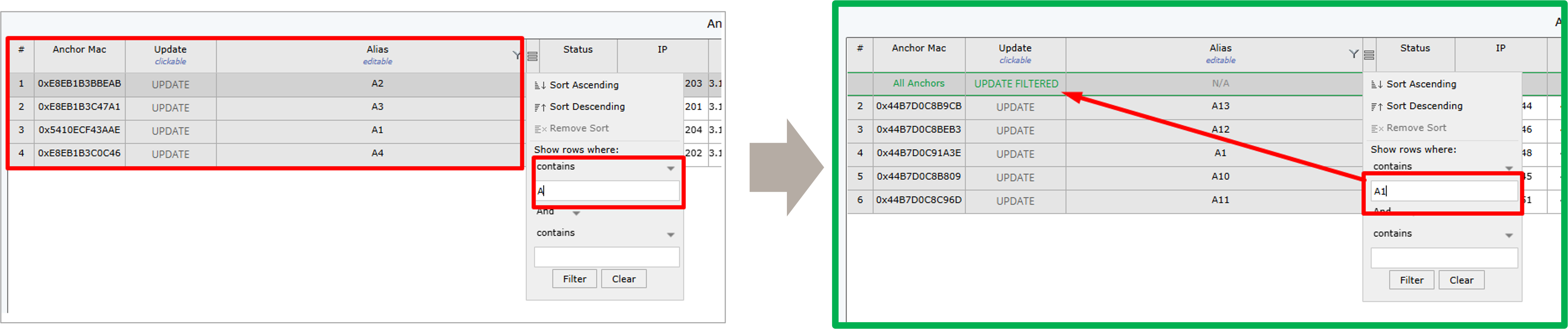
Last but not least, in the RTLS Studio 3.6 we’ve introduced Update Group Filtering in RTLS Manager, making changes to Anchor reconfiguration faster and more efficient.
You can now filter groups of anchors, define parameters for the selected subset, and perform batch updates only on anchors that match the applied filters.
This feature simplifies large-scale configuration changes and reduces the time required to manage complex deployments.
If you're interested in learning more about the features of the RTLS Studio 3.6, don't hesitate to contact us at support@sewio.net!